
1. Log in to your cPanel account.
2. In the Databases section, click on MySQL Databases.

3. In the New Database field, enter a name for the new database you wish to create.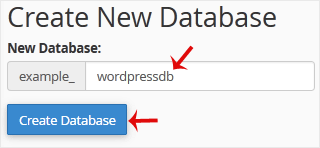
4. Click on Create Database.
أقسام الشروحات
Backup/Restore
4
Cloudflare (cPanel)
9
CloudLinux (cPanel)
10
cPanel - Control Panel
54
Databases
11
DirectAdmin
49
DNS - Nameservers
6
Domain
1
Domain Management
10
Email
17
FTP
9
Hosting
1
Installing a Control Panel
6
Mail Filters & SPAM
8
Make money With Hostayer
0
Mobile
11
New account
0
Others
3
PayPal
7
Plesk
47
Security
10
SiteWorx (Control Panel)
58
Softaculous
69
SolusVM
18
SSL
5
Virtualizor
19
vps servers hostayer
15
WHM
18
WordPress
17
أقسام الشروحات
How to Create a Database in cPanel طباعة
- 0
هل كانت المقالة مفيدة ؟
مقالات مشابهة
How to Rename a Database in cPanel
1. Log in to your cPanel account.
2. In the Databases section, click on MySQL Databases. 3....
How to Delete a Database in cPanel
1. Log in to your cPanel account.
2. In the Databases section, click on MySQL Databases.
3....
How to Add a User to a Database and Grant Privileges
1. Log in to your cPanel account.
2. In the Databases section, click on MySQL Databases. 3....
How to Import a Database via phpMyAdmin in cPanel
1. Log in to your cPanel account.2. In the Databases section, click on phpMyAdmin.3. From the...
How to Export Database Table via phpMyAdmin in cPanel
1. Log in to your cPanel account.2. In the Databases section, click on phpMyAdmin.
3. From the...
