
Hostayer
Web hostingSiteler, mağazalar ve uygulamalar için hızlı LiteSpeed hosting. WordPress hostingBir dakikada kurulan WordPress, LiteSpeed Cache ile. VPS sunucularTam root erişimli kendi sunucun. Ajanslar için hostingMüşterilerini barındır, her yenilemede %20 kazan.
Alan adı aramaBoş bir isim bul, yenileme fiyatını baştan gör. Alan adı transferiSahip olduğun alan adını Hostayer'a taşı. Alan adı fiyatlarıHer uzantı için ilk yıl ve yenileme fiyatları.
Dokümanlar ve rehberlerHosting, e-posta ve alan adları için adım adım cevaplar. Talep açEkibimizle Türkçe, Arapça veya İngilizce konuş.
Ajanslar için
EN TR ع
0 Giriş Hemen başla
Hosting WordPress VPS sunucular Alan adları Ajanslar için Dokümanlar Giriş
EN TR ع
  1. Ana Sayfa
  2. Bilgi Bankası
  3. SiteWorx (Control Panel)
  4. Email
  5. How to Access Email from SiteWorx Webmail

  Kategoriler

Backup/Restore
4
Cloudflare (cPanel)
9
CloudLinux (cPanel)
10
cPanel - Control Panel
54
Databases
11
DirectAdmin
49
DNS - Nameservers
6
Domain
1
Domain Management
10
Email
17
FTP
9
Hosting
1
Installing a Control Panel
6
Mail Filters & SPAM
8
Make money With Hostayer
0
Mobile
11
New account
0
Others
3
PayPal
7
Plesk
47
Security
10
SiteWorx (Control Panel)
58
Softaculous
69
SolusVM
18
SSL
5
Virtualizor
19
vps servers hostayer
15
WHM
18
WordPress
17

  Kategoriler

  Destek

Destek Bildirimlerim
Duyurular
Bilgi Bankası
Dosyalar
Sunucu/Ağ Durumu
Yeni Destek Bildirimi

How to Access Email from SiteWorx Webmail Yazdır

  • 0

You can access your Email account from Webmail.


1
. Log in to your SiteWorx account.


2. In the Email section, click on Webmail.


3. Enter your full email address and password. Choose your Webmail reader and click on Login.
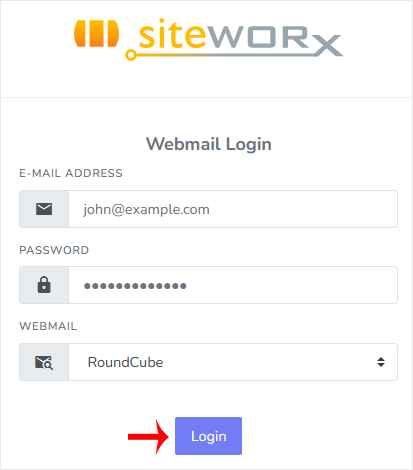

You can manage your email account from the webmail reader.


Bu cevap yeterince yardımcı oldu mu?

İlgili diğer dökümanlar

How to Remove an Email Account in SiteWorx To remove an email account, perform the following steps:   1. Log in to your SiteWorx account.... How to Forward an Email to Third-party Email Providers 1. Log in to your SiteWorx account. 2. In the Email section, click on Aliases.   3. Click on... How to Create or Remove the Email Autoresponder in SiteWorx You can use the email autoresponder for an automated response to your email subscribers. It can... How to Change Your Email Password in SiteWorx You can change your email password in SiteWorx through the following steps: 1. Log in to your... How to Create an Email Account in SiteWorx To create a new email account, perform the following steps: 1. Log in to your SiteWorx account....
<< Geri
Hostayer

Türkiye ve Arap dünyasındaki işletmeler için hosting, alan adı ve destek.

Hosting Web hosting WordPress VPS sunucular
Alan adları Alan adı kaydet Alan adı transferi
Hostayer İş ortakları İletişim Bilgi Bankası
© 2026 Hostayer. Tüm hakları saklıdır. Gizlilik Politikası Hizmet Şartları

Yükleniyor...
Yükleniyor...
Dil seçin
العربية
Azerbaijani
Català
中文
Hrvatski
Čeština
Dansk
Nederlands
English
Estonian
Persian
Français
Deutsch
עברית
Magyar
Italiano
Macedonian
Norwegian
Português
Português
Română
Русский
Español
Svenska
Türkçe
Українська

Para Birimi

$ USD
£ GBP

Şifre oluştur

Şifre uzunluğu için 8 ile 64 arasında bir sayı girin