
Hostayer
Web hostingFast LiteSpeed hosting for sites, stores and apps. WordPress hostingWordPress installed in a minute, with LiteSpeed Cache. VPS serversYour own server with full root access. Hosting for agenciesHost your clients and earn 20% on every renewal.
Domain searchFind a free name and see renewal prices upfront. Transfer a domainMove a domain you already own to Hostayer. Domain pricesFirst-year and renewal prices for every extension.
Docs and guidesStep-by-step answers for hosting, email and domains. Open a ticketTalk to our team in English, Arabic or Turkish.
For agencies
EN TR ع
0 Log in Get started
Hosting WordPress VPS servers Domains For agencies Docs Log in
EN TR ع
  1. Portal Home
  2. Knowledgebase
  3. cPanel - Control Panel
  4. How to Change the Language of Your cPanel Account

  Categories

Backup/Restore
4
Cloudflare (cPanel)
9
CloudLinux (cPanel)
10
cPanel - Control Panel
54
Databases
11
DirectAdmin
49
DNS - Nameservers
6
Domain
1
Domain Management
10
Email
17
FTP
9
Hosting
1
Installing a Control Panel
6
Mail Filters & SPAM
8
Make money With Hostayer
0
Mobile
11
New account
0
Others
3
PayPal
7
Plesk
47
Security
10
SiteWorx (Control Panel)
58
Softaculous
69
SolusVM
18
SSL
5
Virtualizor
19
vps servers hostayer
15
WHM
18
WordPress
17

  Categories

  Support

My Support Tickets
Announcements
Knowledgebase
Downloads
Network Status
Open Ticket

How to Change the Language of Your cPanel Account Print

  • 0

cPanel supports many languages. If you want to change your cPanel language to a native one, you should follow this tutorial.


1. Log in to your cPanel account.


2. In the Preferences section, click on Change Language.


3. Select the appropriate language from the drop-down menu and click on Change.
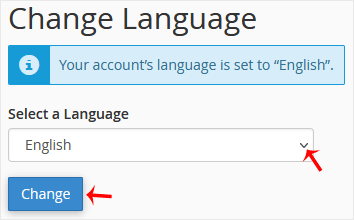

The language in your cPanel has been successfully changed.


Was this answer helpful?

Related Articles

How to Reset cPanel's Account Password If you have access to your cPanel account, follow these steps to reset your password:1. Log in to... How to Change cPanel's Style/Theme Switching over to another cPanel theme with a different style is easy.1. Log in to your cPanel... How to Upload Files via the cPanel File Manager You can use cPanel's inbuilt file manager instead of an FTP program. 1. Log in to your cPanel... How to Edit (Dot)htaccess File in the cPanel File Manager 1. Log in to your cPanel account. 2. In the Files section, click on File Manager.  3. Navigate... How to Check the Disk Usage and the Bandwidth Usage of Directories If you are getting a disk space usage warning from cPanel and don't know which directory is using...
« Back
Hostayer

Hosting, domains and support for businesses in the Arab world and Türkiye.

Hosting Web hosting WordPress VPS servers
Domains Register a domain Transfer a domain
Hostayer Partners Contact us Knowledgebase
© 2026 Hostayer. All rights reserved. Privacy Policy Terms of Service

Loading...
Loading...
Choose language
العربية
Azerbaijani
Català
中文
Hrvatski
Čeština
Dansk
Nederlands
English
Estonian
Persian
Français
Deutsch
עברית
Magyar
Italiano
Macedonian
Norwegian
Português
Português
Română
Русский
Español
Svenska
Türkçe
Українська

Choose Currency

$ USD
£ GBP

Generate Password

Please enter a number between 8 and 64 for the password length